
How to journal your trades
Import your broker's trade history as a CSV instead of typing in each trade. Then open any trade and replay it on its chart.
Example: AAPL, NVDA and SPY, Sep 1 to 21, imported.
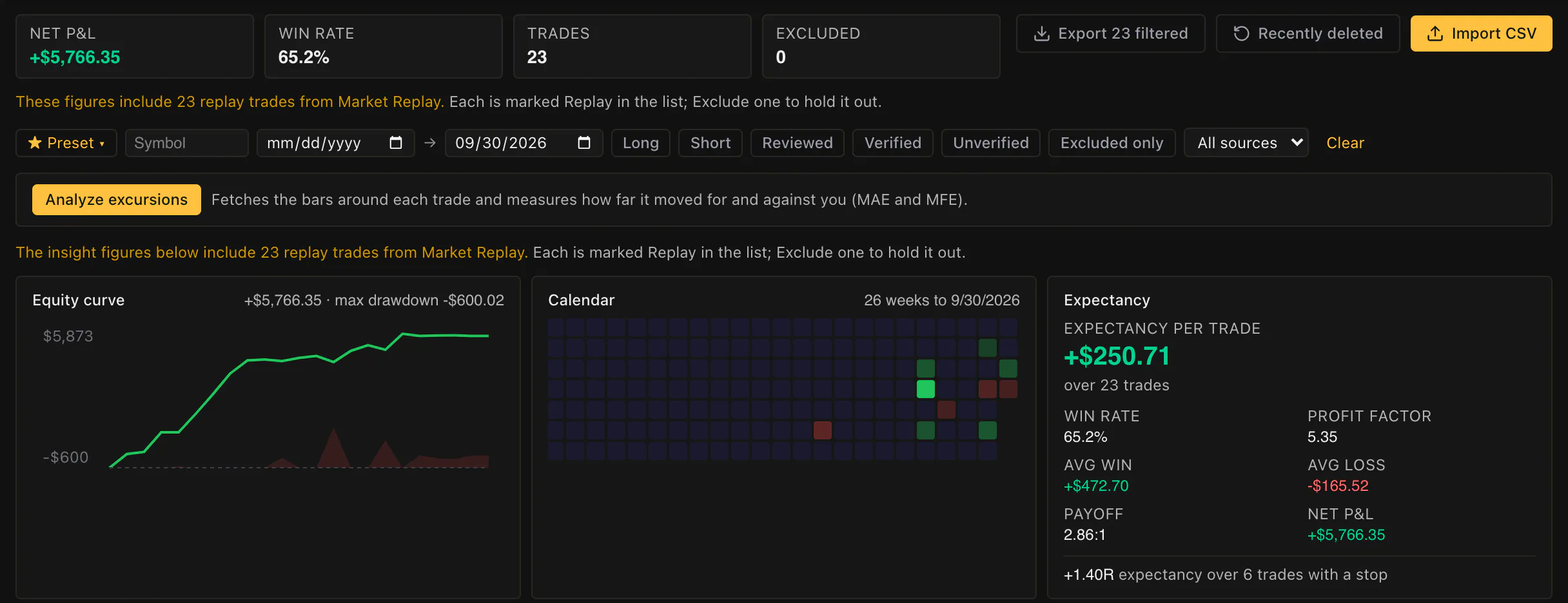
Your stats
Win rate, expectancy and a P&L calendar.
Every import updates them, and each day on the calendar shows its P&L.
Review a trade
Replay it on its chart.
Play a trade back bar by bar with every fill marked, or redo it from just before your entry.
Questions
Before you try it.
How do I get my trades in?
Download your trade history from your broker as a CSV, with one row per fill, and import it. Check how each column was read before you import.
Is there broker sync?
No. You import trades from a CSV file.
Is the journal free?
Yes. A free account stores up to 10,000 trades and replays any trade from the last 30 weekdays.
Are my replay trades saved too?
Yes. Every trade you close in a market replay is saved to your journal when you're signed in.
Which markets can I journal?
US stocks and ETFs.
Read more
More on journaling your trades.
Trade replay
Replay any trade in your journal bar by bar.
Import from Interactive Brokers
Import a Flex Query CSV.
Switch from TradeZella
Import your broker's CSV, or send us your export.
Switch from Tradervue
Import your broker's CSV, or send us your export.
Replace your trading spreadsheet
Import your sheet, one row per trade.
vs Tradervue
Compare the free plans side by side.
vs TradeZella
Compare price and trade replay side by side.
Free trading journal
See your stats and P&L calendar, and replay any trade.
A free journal that replays every trade.
No card required.
Example: META, Sep 29, replayed.